AI AgentsFeatured StoryCompany-Contributed Story
Inside Timon: The Open-Source Agentic Workstation for AI Coding Agents
Timon is an open-source, local-first workstation that coordinates AI coding agents on your machine, with review, merge, and overnight pipelines.
T
Timon
By YesPapa Editorial
Published:
7 min read
Editorial Disclosure: This story was contributed free of charge by Timon and reviewed by YesPapa Editorial. Outbound promotional links carry
rel="sponsored nofollow".Anyone who has tried to run more than one AI coding agent on a real project already knows the gap. A single model can draft a function, or even open a pull request. Coordinating several of them is a different problem: who breaks the work into tasks, who reviews the diff, how you stop two agents from colliding, and what happens when a provider hits its usage limit after you have gone to bed.
Timon is an open-source agentic workstation built for that second problem. It is a desktop app, backed by a local daemon, that runs AI coding agents such as Claude Code, Codex, GitHub Copilot, Grok, opencode, and Hermes in one workspace on a machine you own. You describe the work, approve the plan, and the pipeline can keep going after you close the window. The project's own line for this is simple: ship while you sleep.
The team is based in France and publishes as Timon from @ai_timon, with founder @Saucisse_dev. In November 2026 they made the source public. As of mid-November, the repository at github.com/ai-timon/timon had crossed 500 GitHub stars, and the current packaged release was Timon 0.1.9.
What Timon is
Timon is not another chat tab. It sits between you and the agent command-line tools you already use. A daemon on Windows, macOS, or Linux holds the state and can keep running as a system service after the window is closed. The clients (desktop, browser, phone, Telegram, or the CLI) hold none of that state.
The workstation is local-first. Your code stays on your disk, and only the requests your agents send to the AI providers you chose leave the machine. Timon also does not resell model usage. It runs through the CLI subscriptions, API keys, or custom endpoints you already have. A web interface, served by the same local daemon, works on a phone and can notify you when an agent needs a decision. A mobile PWA is listed as coming soon.
How the workstation runs a job
You tell Timon what you need. An orchestrator splits the job into Kanban tasks and assigns pieces to specialized roles: a coder in its own git worktree, a reviewer on the diff (often with a different model), and a merger that runs checks before the branch lands. The default team also includes a researcher and an ops role. Roles are fields, not fixed names. You can rename them, add your own, or import agents you already have.
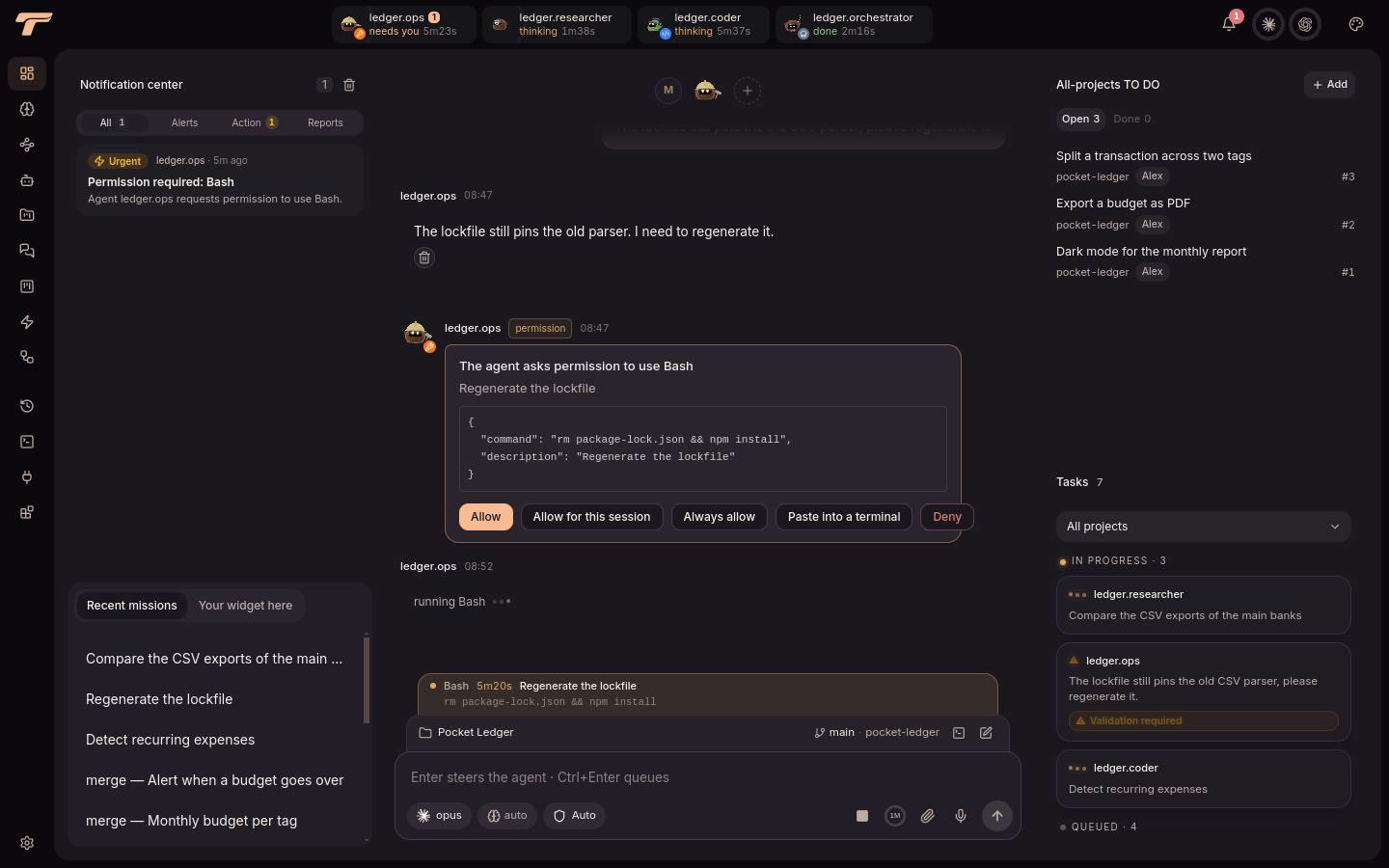
The path is deliberate. You approve a plan, work happens in isolated worktrees, a second model can review the change, and a merger lands it only after checks pass. Actions that matter, including a push, a publish, or a delete, still require an explicit yes. In the team's DEV Community announcement, they wrote: "This isn't a promise that agents never make mistakes. It's a way to make their work more visible, reviewable and manageable."
Unattended work is the other half of the design. If one provider hits its limit, Timon can hand the same conversation, with full context, to the next backend you configured. A local notes vault can be read before an agent acts and updated when it learns. You can queue work overnight, spread it until morning, and start jobs from cron or from GitHub and GitLab webhooks. Workflows can also be drawn on a canvas, and each run leaves a trace you can replay.

The workspace can show two, four, six, or nine live conversations side by side. Signed plugins add widgets, pages, themes, and tools without a restart. You can switch models mid-thread without dropping the context, and pick a different model per role. Public docs also list additional backends, including Pi, Kimi, Ollama Cloud, and Google Antigravity.
Why open source matters here
On 14 November 2026 the team marked the public release in that DEV Community post. The core of Timon (the daemon, the web app, the desktop app, the docs site, and bundled plugins) is licensed under the GNU Affero General Public License v3.0, with an additional permission that leaves plugins free to use any licence. The @timon-ai/sdk package and the plugin templates are under MIT. The name, the logo, and the mascot are trademarks and are not covered by those software licences.
That split is deliberate. Developers can inspect how the workstation talks to their repositories, report issues, contribute translations, and ship extensions without waiting for a maintainer to merge a fork. For a tool that can execute code and open pull requests, readable source is part of the trust model. The project is still early, in the 0.1 series, and plugins have already started to appear from outside the core team.
Who Timon is for
Timon is a fit if you already use at least one supported agent CLI and want a single place to plan, watch, and approve the work. That includes developers who have outgrown a pile of terminal tabs, and people who want a machine or a VPS to keep going overnight. It is less of a fit if you want a hosted chat product that rents you a tab in the cloud and bills tokens on your behalf.
You will need Windows 10 or later on x64, macOS 11 or later on Apple silicon, or Linux on x64 with glibc 2.28 or later. There is no official Linux package for ARM, and the desktop macOS build is for Apple silicon.
How to get started
The official installer downloads a package from a signed release list and checks its size and checksum before installing anything.
On Linux and macOS:
curl -fsSL https://timon-ai.com/install.sh | shOn Windows, in PowerShell:
irm https://timon-ai.com/install.ps1 | iexInstallers are also on GitHub Releases. You need one agent CLI already signed in, such as claude, codex, copilot, grok, opencode, pi, or hermes-acp. Once Timon is running, timon doctor checks the service and the backends.
The first launch walks through language, whether the daemon should keep running after you log out, and a local account. Timon says it collects an email only so you can reset a password; the account itself stays on your machine. The project's own site notes that the desktop apps are not code-signed yet, so Windows SmartScreen may warn on first launch. The installation guide covers each system. The team also recommends starting with a small repository and a feature that has a clear acceptance test.
FAQ
What is Timon? An agentic workstation: a desktop app and local daemon that run AI coding agents in parallel on your machine. Tasks go through a Kanban board, and each coding task can be written, reviewed, and merged in its own git worktree.
Do I need new AI subscriptions? No. Timon works with the subscriptions, API keys, or custom endpoints you already have. You can pick a model per role and switch models mid-conversation without losing context.
Where does my code live? On your disk. Only the requests your agents send to the AI providers you chose leave the machine.
Can it work while I sleep? Yes, within the limits of your machine and your model quotas. You can queue tasks overnight, and the daemon can keep running after you close the window. Important actions still wait for your approval.
The early bet
Timon is an early, open-source attempt to treat AI coding agents as a team rather than a stack of chat sessions. The interesting claim is not that the agents are perfect. It is that the plan, the isolated worktree, the second-model review, the merge, and the human checkpoint can live in one workstation you actually control.
If you want to look closer, start at timon-ai.com, read the documentation, or open the source. There is also a Discord for feedback and plugins.
Building something interesting with AI? Share your story on YesPapa Insights.
Sources
- Timon website
- Timon documentation, including installation overview, requirements, first run, and concepts
- ai-timon/timon on GitHub, LICENSING.md, TRADEMARKS.md, and Timon 0.1.9 release
- We Open-Sourced Timon, DEV Community, 14 November 2026
- Official X account @ai_timon and founder @Saucisse_dev
T
Published By
Timon · YesPapa Editorial
YesPapa Creator Network
Launching an AI product? Find creators to promote it.
Browse vetted AI & Tech X creators, inspect audience fit, and send direct collaboration requests in minutes.
Related AI Insights
All InsightsAI Agents
How to Build an AI Agent: Architecture, Tools, and Real Costs
YesPapa · Nov 17, 2026 · 8 min read
AI Agents
AI Agents vs AI Chatbots: What's Actually Different?
YesPapa · Nov 17, 2026 · 10 min read
Research
X Influencer Rates in 2026: What 745 Listed Creators Actually Charge
YesPapa · Nov 19, 2026 · 3 min read